

xTool Desktop Air Purifier for F2/F1/M1 Ultra
Selling fast! 4 people have this in their carts.
Delivery in the UAE
Same-day delivery (Dubai only): order before 12:00 PM. Standard delivery cutoff 4:00 PM (UAE time).
- Same-day delivery: order before 12:00 PM. Currently available in Dubai only.
- Standard delivery: 1–2 business days. Order before 4:00 PM.
- Remote areas: 2–3 business days. No same-day delivery.
Orders placed after the cutoff, on Sundays or on public holidays are processed the next business day. No Sunday deliveries. Delivery times are estimates.
Check your delivery area
Return within 2 days of purchase (Original unopened package).
5% VAT included.
Guaranteed Safe Checkout

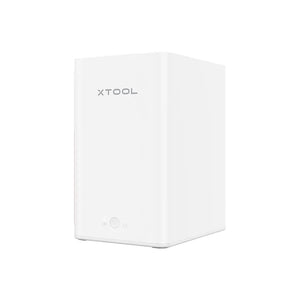
xTool Desktop Air Purifier for F2, F1 and M1 Ultra
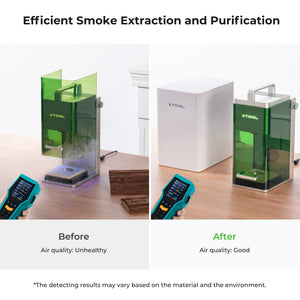
A desktop fume extractor for xTool F2, F1 and M1 Ultra laser work. Smoke and odour leave the machine, pass through a pre-filter, an H13 True HEPA element and activated carbon, and come out as filtered air instead of a haze across your desk. Three fan speeds, replaceable filters, and an exhaust pipe in the box if you would rather vent outside.
Key Features
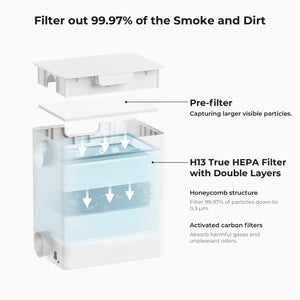
- Three-stage filtration — a pre-filter catches visible particles at 5 micrometres and above, a double-layer H13 True HEPA element handles the fine fraction, and activated carbon absorbs gases and odour.
- 99.97% down to 0.3 micrometres, as reported by xTool under its own test conditions.
- Three fan speeds — xTool suggests minimum or middle for infrared laser work and maximum for diode laser work.
- Automatic start with the xTool F1 — connected by cable, the purifier runs when the laser runs and keeps going for ten seconds after it stops. Working time is configurable in xTool Creative Space. This behaviour is documented for the F1 specifically.
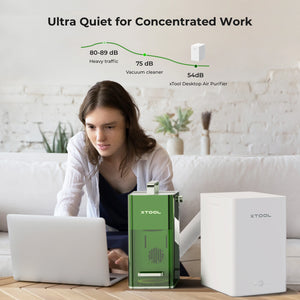
- No more than 55 dB, per xTool's specification. Quiet enough to sit next to.
- Replaceable filters — two spare pre-filters are included, and full filter packs are available separately.
- Vent outside if you prefer — an exhaust pipe and adapter are in the box for routing extraction out of the room.
Why Extraction Matters on a Desktop Laser
Cutting and engraving burns material. Wood, acrylic, leather and coated metals all give off smoke, fine particles and odour, and on an open desk that goes straight into the room you are sitting in. Beyond comfort, the residue settles on your optics: a lens coated in smoke loses power and starts producing inconsistent engraves, which is usually blamed on the machine long before anyone cleans the lens.
A purifier solves three problems at once — the air you breathe, the smell that lingers in a home or office, and the film that builds up on the laser's own optics and work area.
One thing it does not do is make every material safe to cut. Some materials, PVC and vinyl in particular, release gases that should never be put through a laser at all, filtration or not. Check the material before the job, not the filter.
Technical Specifications
| Compatible machines | xTool F2, F1, M1 Ultra |
|---|---|
| Dimensions | 285 × 190 × 296 mm |
| Product weight | 4.6 kg |
| Filter stages | Pre-filter · H13 True HEPA, double layer · activated carbon |
| Pre-filter capture | Visible particles 5 micrometres and above |
| HEPA filtration | 99.97% of particles down to 0.3 micrometres (xTool test claim) |
| Fan speeds | 3 levels |
| Noise | No more than 55 dB (xTool specification) |
| Power input | 24 V / 2.5 A DC, via the supplied power adapter |
| Connections | Type-C / Mini USB |
| Brand | xTool |
Performance figures are xTool's, measured under their optimised conditions. Real results vary with the material, the job and the room.
What's in the Box
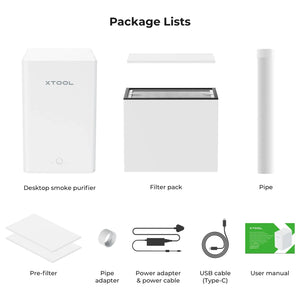
- Desktop smoke purifier
- Filter pack (installed)
- 2 × spare pre-filters
- Exhaust pipe
- Pipe adapter
- Power adapter and power cable
- USB cable (Type-C)
- User manual
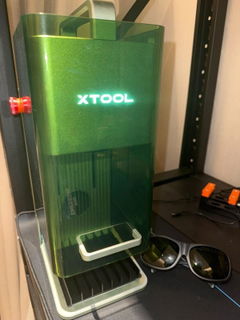
The laser machine shown in the product photography is not included.
Setting It Up
- Fit the pipe adapter to your machine's exhaust outlet and connect the exhaust pipe to the purifier.
- Connect the power adapter, and the USB cable if you are running an F1 and want the automatic start.
- Pick a fan speed — lower for infrared work, maximum for diode work.
- If smoke or smell still bothers you, use the included pipe to route the purifier's output to a window instead of back into the room.
Filter Maintenance
The pre-filter is the part that loads up first and is designed to be swapped. xTool's guidance is to replace the whole filter pack once you have been through three pre-filters. Two spares come in the box, so a replacement pack is the consumable to keep on the shelf. How fast you get through them depends entirely on what you cut — plywood and MDF load a filter far faster than anodised aluminium.
Compatibility
This purifier is the F2 / F1 / M1 Ultra version. It is not the right unit for the xTool P2, P2S, F1 Ultra, S1, M1 or D Series — those machines take a different purifier.
For the xTool M2, this purifier needs the separate M2 exhaust duct adapter, which is sold on its own.
The automatic start-and-stop synchronisation is documented by xTool for the F1. On the F2 and M1 Ultra, run the purifier manually alongside the machine unless xTool's documentation for your model says otherwise.
Why Buy from Omnimakers
- Held in the UAE. Local stock rather than an overseas marketplace order, so it arrives in days instead of weeks — and a 4.6 kg appliance is an expensive thing to ship in yourself.
- Priced in AED, all in. No customs surprises, no card conversion fee, no import charge at the door.
- We sell the machines it bolts onto. Omnimakers stocks the xTool F2, F2 Ultra and the F-series accessories, so fitment and hose questions get a straight answer.
- Filters when you need them. Replacement packs are a consumable, and buying locally means not waiting three weeks for one.
- Support in your timezone from people who run these lasers.
Frequently Asked Questions
Which xTool machines does this fit?
The F2, F1 and M1 Ultra. It is not the correct purifier for the P2, P2S, F1 Ultra, S1, M1 or D Series — those use a different model.
Can I use it with the xTool M2?
Yes, but you need the separate M2 exhaust duct adapter. It is not included here.
Will it start and stop with my laser automatically?
On the F1, yes — connect the cable and it runs with the laser and stops ten seconds after. xTool documents that behaviour for the F1 specifically, so on the F2 and M1 Ultra plan on switching it on yourself.
Is the laser machine included?
No. This is the purifier, its filters, pipe, adapter and power supply. Machines in the photographs are shown to illustrate use.
How loud is it?
xTool specifies no more than 55 dB. That is conversation-level — noticeable but not intrusive. The figure is xTool's, measured under their conditions, and the fan is louder at maximum speed than at minimum.
Does it remove the smell completely?
The activated carbon stage is there to absorb odour and it makes a large difference, but no desktop filter removes all of it from every material. If you are sensitive, or cutting something strong like MDF or leather, use the included pipe to vent the output to a window.
Does using a purifier mean I can cut any material?
No, and this matters. Some materials should never go in a laser regardless of filtration — PVC and vinyl release chlorine gas that harms you and corrodes the machine. Filtration manages the by-products of materials that are safe to cut; it does not make unsafe ones safe.
How often do filters need replacing, and what do they cost?
The pre-filter loads first and two spares are in the box. xTool advises replacing the full filter pack after three pre-filters have been used. Replacement packs are bought separately. Frequency depends on material — plywood and MDF load filters much faster than metals.
How do I change the filter?
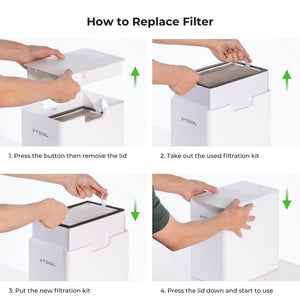
Press the release button, lift the lid, take out the used filtration kit, drop the new one in and press the lid down. No tools.
Which fan speed should I use?
xTool suggests minimum or middle for infrared laser work and maximum for diode laser work, where there is more smoke to move.
Do I still need to open a window?
Good practice, yes, especially for long jobs or strong-smelling materials. A purifier reduces what reaches the room; it is not a substitute for ventilation.
What power supply does it use?
It runs on 24 V / 2.5 A DC from the included power adapter. That is the device input, not a mains specification — confirm the plug type you need when you order.
How big is it, and where does it sit?
285 × 190 × 296 mm and 4.6 kg, so it sits on the desk or the floor beside the machine. Allow room for the exhaust pipe to run without a sharp kink.
Can it filter for two machines at once?
It is designed for one machine at a time. Running one pipe from two lasers splits the airflow and extraction suffers on both.
| Type |
Air Purifier |
|---|---|
| Variant |
Standard |
| Compatibility |
F2/F1/M1 Ultra |